AudioPeel




| 简体中文 | English |
A lightweight Android video-to-audio tool that exports to MP3 / M4A / WAV / FLAC / OGG
Features
- Video picker — Select a video without requesting storage read/write permission
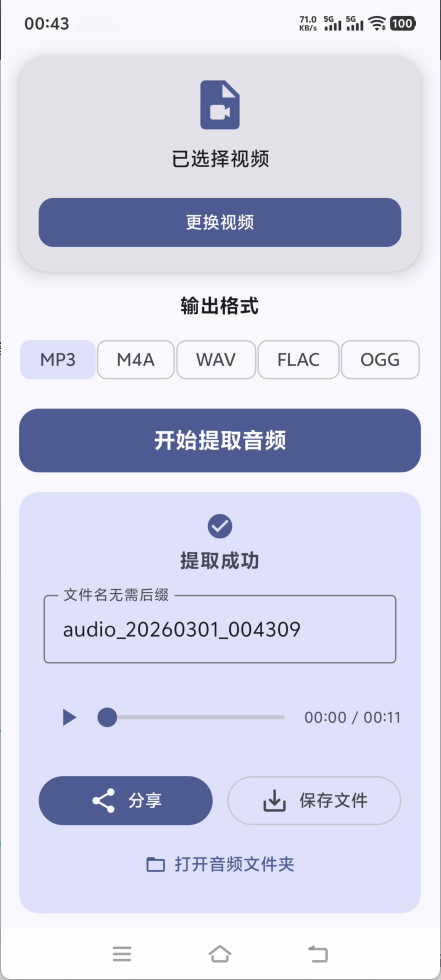
- Video info — Shows ⌈thumbnail/duration/audio codec/file size⌋ after selection and supports fullscreen preview on tap
- Multiple formats — Supports MP3 / M4A / WAV / FLAC / OGG
- Smart suggestion — Detects embedded audio codec and suggests a suitable output format
- Fast extraction — Reads the video directly to reduce copying and stream-copies the audio track when codecs match for faster extraction
- Progress & cancel — Shows circular progress with percentage and supports canceling extraction
- Audio preview — Preview the extracted audio after extraction succeeds
- File management — Supports renaming and saving to
/Music/AudioPeeland opening the audio folder - Share — Supports sharing to apps such as ⌈WeChat/QQ/Telegram⌋
Quick Start
Requirements
- Android 7.0 or later (API 24)
Install
- Download the latest APK from Releases
- Use
arm64-v8aon most Android phones - Use
x86_64on emulators
- Use
- Install and open the app
- Pick a video and confirm the output format before extracting
Screenshots
Tech Stack
| Area | Choice |
|---|---|
| Language | 100% Kotlin |
| UI | Jetpack Compose + Material Design 3 + Edge-to-Edge |
| Media processing | FFmpegKit |
| Audio playback | AndroidX Media3 ExoPlayer |
| Media probing | MediaExtractor + MediaMetadataRetriever |
| Architecture | MVVM + StateFlow |
| Size | R8 + resource shrinking + ABI filters (arm64-v8a, x86_64) |
Build
Prerequisites
- Android Studio (a recent stable release recommended)
- Java 17+ (compatible with the project Gradle version)
- Android SDK (
minSdk24,compileSdk/targetSdk37)
Steps
- Clone the repository:
git clone https://github.com/tianxing-ovo/AudioPeel.git - Open the project root in Android Studio
- Wait for Gradle sync
- Connect a device or emulator
- Run
Run 'app'or./gradlew assembleDebug
Permissions
Least-privilege by design; no sensitive permissions requested:
| Note | Detail |
|---|---|
| No storage permission | Picking a video needs no storage read/write permission |
| No network permission | Fully offline processing with no data upload |
| No background/notification permission | Not requested |
Contributing
Issues and Pull Requests are welcome
- Fork this repository
- Create a feature branch and commit your changes
- Push and open a Pull Request
License
This project is released under the MIT License